Showing posts with label BlackBerry. Show all posts

BlackBerry Z10 Specs and Features


  • Processor: Dual-Core 1.5GHz
  • Display: 4.2”, 4 point multi-touch LCD display, 1280 x 768 resolution at 356 DPI, Touch On Lens
  • Camera: 8MP rear facing camera, Auto Focus, 5X digital zoom, 1080p HD video recording ・2MP front facing camera, 3X digital zoom, 720p HD video recording
  • Memory: 2GB RAM ・16GB Internal Storage ・Hot Swappable microSD Slot
  • WiFi: 802.11 a/b/g/n ・2.4/5GHz ・4G Mobile Hotspot
  • GPS: Assisted, Autonomous, and Simultaneous GPS
  • Battery: 1800mAh Removable ・Talk Time: up to 10 hours on 3G・Standby Time: up to 305 hours on 3G, up to 316 hours on 2G・Audio Playback: up to 60 hours・Video PlayBack: up to 11 hours
  • Sensors: Accelerometer, Magnetometer, Proximity, Gyroscope, Ambient light sensor
  • Connectivity: NFC ・microUSB ・microHDMI-Out ・Bluetooth 4.0 Low Energy
  • Size (LxWxD): 130mm x 65.6mm x 9mm

RIM introduces BBM Voice - Make calls to BBM friends free over Wi-Fi

BlackBerry maker Research in Motion (RIM)  has introduced an awesome new version of BBM today. BBM version 7 includes some great updated features including the new BBM Voice. BBM Voice lets you instantly initiate a voice call with BBM friends for free over a Wi-Fii connection.


Users can continue to text chat with other BBM contacts while they are on a voice call. Voice calling will not work over 3G or cellular networking, likely as a sop to keep mobile operators around the globe happy.

RIM explained the key features of voice calling via BBM:

Customers can initiate a BBM Voice call directly, or instantly switch from a BBM text chat to talk, and back again.
The split-screen feature allows customers to talk and text at the same time, so for example, they can send a picture to their contact while talking with them. They can also check other BBM text chats, check email, or navigate to other apps while engaged on a BBM Voice call.
BBM provides a visual indicator that shows when contacts are available for a voice call.
BBM Voice is compatible with any accessories a customer has now for making voice calls on their BlackBerry smartphone, such as a Bluetooth or wired headset. Customers can also use BBM Voice over their BlackBerry smartphone's speakerphone.
If it's not an ideal time to talk, customers can simply choose to respond by texting back.

BBM version 7 also brings integration with a customer's BlackBerry ID, which is designed to back up their BBM profile, groups and contacts so they can automatically be restored in the event they switch to a new BlackBerry smartphone.

BBM version 7 with the new BBM Voice feature is currently available in Beta for BlackBerry smartphones running the BlackBerry® 6 OS or higher.Customers can sign up to BlackBerry Beta Zone for free at www.BlackBerry.com/betazone

NOTE: BBM requires a BlackBerry service plan.The BBM Voice feature requires a Wi-Fi connection with access to the Internet .BlackBerry Beta Zone is not available in all markets.Check its available for you or not ASAP:)

How to Video chat in Blackberry Playbook

By default BlackBerry Playbook has a good video chat software,but it can be used only to chat between blackberry playbook users.Unavailablitity of native Skype and yahoo messenger app for playbook make things worse.Recently i found a a website called http://aol.com/av which can be useful for playbook users to chat with anyone online.its completely web based and no need to download any software.There is no lag in voice and video [If your internet connection is good] .Moreover You don't even need to sign in!

Steps
Login to http://aol.com/av through default playbook browser


Check box for Age Verification
Click on "Start video Chat"
Check Allow and Remember and then close


You will get a link after that.share that link with your friend/partner through Email/SMS/Call.After they clicking link,you can start video call with them.As simple as that 

Pros :
No need of software
No need of Sign Up
Only person with the link can see you
You can Video chat,Voice chat,Take Photos,Send text messages
Chat from anywhere.Even if skype is not installed on your friends computer

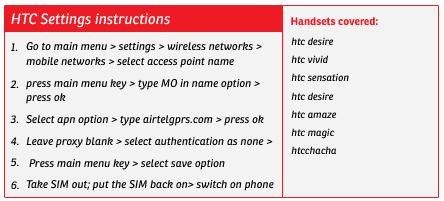
Airtel 3G/GPRS settings for Blackberry, HTC, Samsung and apple iPhone

Customers carrying Blackberry, HTC, Samsung and apple iPhone smartphones can now add the GPRS/3G or Mobile Internet settings manually. All they need to do is follow some easy steps mentioned below.
For BlackBerry handsets mentioned below, kindly follow these instructions –:
For Apple iPhone devices mentioned below, follow these instructions –:
For HTC devices mentioned below, follow these instructions –:
For Samsung devices mentioned below, follow these instructions -:


Via : TelecomTalk

How to delete data on your phone before selling it


It's phone upgrading season, and if you are looking to sell your phone on eBay or craigslist or friends or to any shops,Please don't forget to wipe your data before your phone changes hands. Here's a quick guide for anyone who might need it, so you're not fumbling through options and settings for half the day.

iPhone

  • First, you should probably back up your phone using iTunes
  • Go to Settings
  • From there, go to General
  • Now go to Reset
  • Select Erase All Content and Settings
  • You'll be prompted to enter your passcode at this point
  • It will take a few minutes, unless you've got a fairly ancient iOS device

  • Android

  • Backing up for Android is relatively straightforward; just connect your phone to your computer via USB and drag all of your files into a new folder.
  • Pull down your Menu and go to Settings
  • Scroll to Privacy
  • Click Factory data reset

  • Windows Phone 7 and 7.5

  • Back up with Zune software if you're on Windows, but there's currently no way to totally back up your SMS texts for Windows Phone, so keep that in mind if you like to keep hang onto your messages.
  • Go to Settings
  • Tap About
  • Scroll to the bottom of the page and tap "reset your phone"
  • Press "yes" when the warning prompt appears
  • Warning: You won't be asked to confirm your password

  • BlackBerry OS 6

  • Use BlackBerry Desktop Manager to back up your phone
  • Go to Options
  • Scroll to Security
  • Now scroll to Security Wipe
  • Select all options (Email & Contacts, Applications, Media card)
  • Type the word "blackberry" into the box and hit confirm
Via : Gizmodo

Subscribe to Newsletter

Enter your email address:

Total Pageviews

 
Additive Tricks © 2011 | Designed by Shabeer Ibm